
The outcomes that appear on report cards have all been imported to Canvas for you to use in your courses if you'd like to track that data in the mastry gradebook in Canvas.
You can also add your own outcomes to track if you want to.
Note:
Outcomes need to be setup in advance in a course. Once course is running and outcomes have been assessed, outcomes cannot be changed or adjusted.
To Import Report Card Outcomes
1) In your Canvas Course click on Outcomes in the menu on the left
2) Click on Find in the top right corner 
3) On the left side of the screen, use the arrows to expand and find your department's outcomes 
4) Once you see your outcomes listed on the right, click on "Add All Outcomes"
To start using outcomes, add them to your rubrics. When you are creating your rubric, there is an option for "Create from Outcome" where you can simply select the outcomes you have imported and add them to your rubric. NOTE: The points for the outcomes cannot be changed, so uncheck the box that says "Use this criterion for scoring". This way the outcome will be calculated in your mastery gradebook, not scored by points in the regular gradebook. 
Tips:
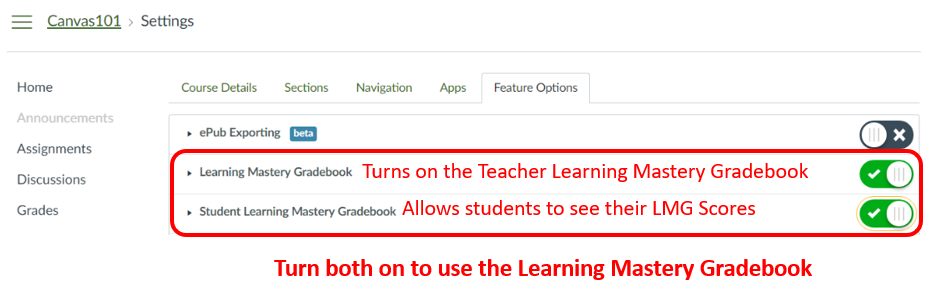
Ensure that Learning Mastery Gradebooks is enabled inyour course settings:
Go to Settings > Feature Options and turn on:
Learning Mastery Gradebook
Student Learning Mastery Gradebook
View the learning Mastery Gradebook by toggling in the top left corner from Traditional Gradebook to Learning Mastery Gradebook
